S.01 · Swop MCPLive

Swop, inside any AI.

Paste one URL into ChatGPT, Claude or Grok. Your AI can look people up, sell, pay and trade with Swop, inside the caps you set.

Full setup guide ↗
mcp.swopme.co/mcp51 toolsOAuth 2.1 sign-inYour caps
mcp.swopme.co/mcp
Three things to know

Swop MCP, in three lines.

Paste one URL.

Add https://mcp.swopme.co/mcp as a custom connector in ChatGPT, Claude or Grok. That's the whole setup.

51 Swop tools.

Look people up, browse stores and markets, sell, pay, swap, trade and manage your AI agent, all from a chat.

27 work with no sign-in

Your limits, always.

You sign in with Swop over OAuth, never a password in chat, and money tools stay inside the caps and consent you set.

Settings → AI assistants
S.02 · In 30 seconds

The Swop MCP, in 30 seconds.

Paste one web address into ChatGPT, Claude or Grok, and that assistant can look people up, sell for you and, if you allow it, pay inside your limits.

What it is
A connector (a plug-in that lets an AI assistant use another app) that gives your AI 51 Swop tools. It speaks MCP (Model Context Protocol, the open standard assistants use to call outside tools).
Who it's for
People who already work in ChatGPT, Claude or Grok and want Swop there too, and developers building their own agents.
What it costs
Nothing to connect. Anything you buy, sell or swap costs the same as it does in the Swop app.
What you need
Nothing to look things up. For your own account you sign in with OAuth (you approve the link in the Swop app; no password goes into the chat), and spending stays inside your caps (per-payment and daily limits you set).
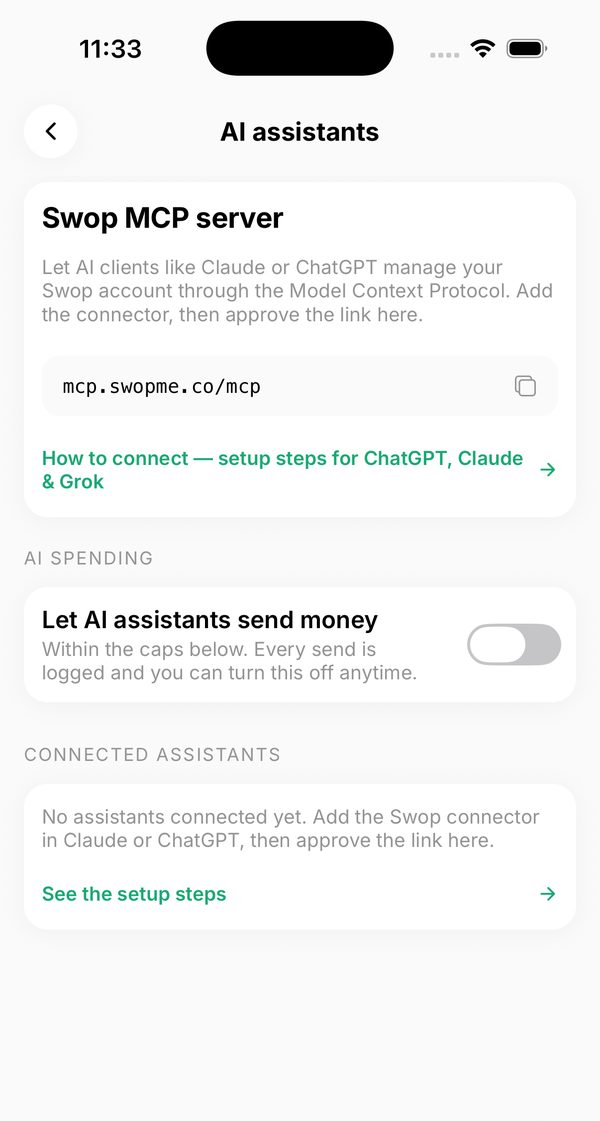
  1. Swop app Settings, AI assistants: the Swop MCP server URL, a switch to let AI assistants send money, and connected assistantsIn the Swop app today

    01Copy the address

    In the Swop app, Settings → AI assistants shows the connector URL with a copy button, plus the switch for AI spending.

  2. GChatGPTCClaudeXGrok
    mcp.swopme.co/mcp
    Sign in with Swop ✓
    Illustration

    02Add it to your assistant

    Paste it as a custom connector in ChatGPT, Claude or Grok, then approve the sign-in in Swop.

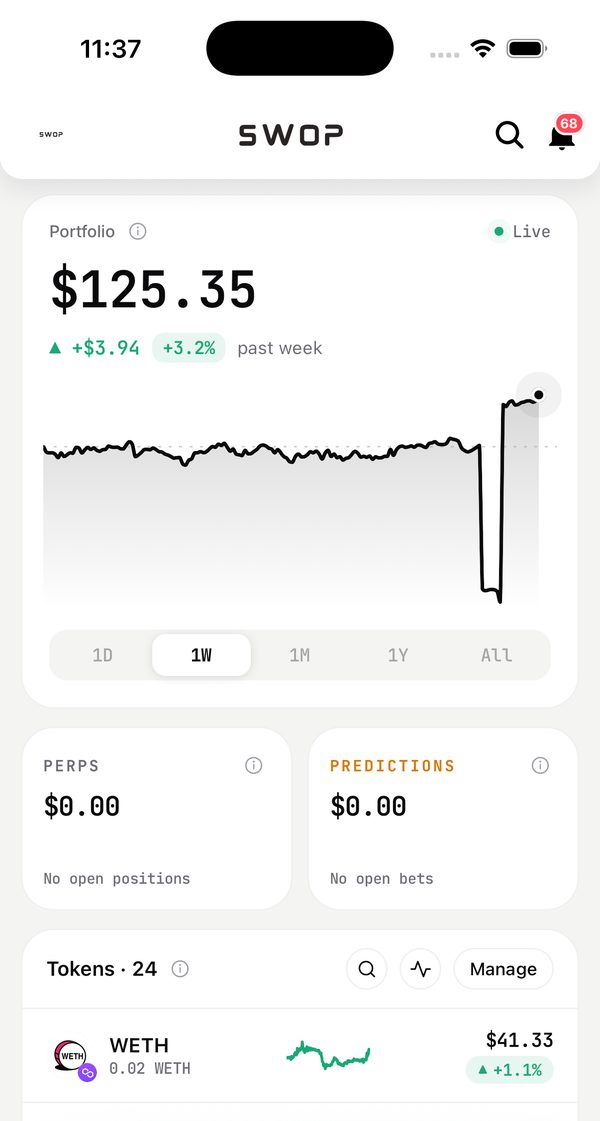
  3. Swop wallet: portfolio, perps and predictions totals and token listIn the Swop app today

    03Everything lands in your Swop

    Every send, swap or purchase your AI makes shows up in your Swop wallet and activity, like anything else.

S.03 · Follow a request

From a chat to your wallet.

Tap a step, or hover any box to see what it connects to.

S.04 · Connect in a minute

One URL. Three assistants.

Add Swop as a custom connector. Public tools work right away; anything personal asks you to sign in with Swop.

https://mcp.swopme.co/mcp

Linking never needs a password in the chat. Your assistant opens a Swop sign-in page, and approving it in the app finishes the link.

Prefer one click? The Swop plugin in ChatGPT's directory is In review. It covers discovery and profile edits, and hands money actions to the Swop app for you to approve.

  1. Open Settings → Connectors. Turn on Developer mode if it asks.
  2. Choose Add custom connector.
  3. Paste https://mcp.swopme.co/mcp and connect.
  4. Sign in with Swop when a tool needs your account.
S.05 · What it feels like

Ask in plain words. Swop does the work.

The four things people ask most, shown as an illustration of a chat with the Swop connector. The tool names are the real ones.

01 · Discover

Look anyone up. No sign-in.

Resolve a swop.id to its wallet and profile, search people and creators, browse stores and live prediction markets.

02 · Sell

Your store, by chat.

Create a product, edit your SmartSite, check balances and orders. Every product is instantly sellable to people and AI agents.

03 · Pay

Money moves inside your caps.

Send USDC to a name, buy from any Swop store, pay an x402 link, swap on EVM chains. Every action respects the per-payment and daily limits you set.

04 · Trade

Run your agent from any AI.

See your Ovi trading agent's strategies, talk to it, pause or revise a strategy, and approve or reject what it proposes.

S.06 · 51 tools

Three levels of trust, all yours to set.

Think of it as three doors. Public tools need nothing. Personal tools need your sign-in. Money tools need your sign-in and your consent. Of the 51 tools, 38 need you to sign in.

No sign-in

Discover

  • Resolve a swop.id to its wallet and profile
  • Search people and creators
  • Prediction markets: events, order books, prices
  • Browse a store and get an agent-payable product link
Sign in

Manage your Swop

  • Edit your SmartSite: name, bio, links
  • Post to your feed
  • Create and feature products
  • Check balances and orders
Sign in + consent

Move money

  • Send USDC to any swop.id or address
  • Buy from any Swop store; pay an x402 link
  • Swap on EVM chains; perps within margin caps
  • Prediction orders; manage your trading agent

Ovi and MCP, one toolbox

Ovi is Swop's own AI. The MCP opens the same tools to the AI you already use.

OviSwop's AI, in the Swop app
MCPYour AI, with Swop inside

Two endpoints

A full server for you, and a public one with nothing that moves money.

/mcp 51 tools, OAuth 2.1
/mcp/commerce 27 tools, no money tools
S.07 · Your control

Your AI gets a key, not your wallet.

Everything lives in the Swop app under Settings → AI assistants, and on the web at swopme.app/ai-assistants.

01

Add the URL

Paste the connector into ChatGPT, Claude or Grok.

02

Sign in with Swop

OAuth 2.1 with PKCE. You approve in the app; no password in the chat.

03

Set your caps

Per-payment and daily limits. Allow perps and swaps separately.

04

Revoke any time

Turn AI spending off or disconnect any assistant in one tap.

AI spending

You decide whether assistants can spend at all. It's off until you turn it on, and one switch turns it off for every assistant.

In the Swop app today

Every action, on the record

Whatever an assistant does shows up in your activity like any other transaction, under your swop.id.

100%
51Swop tools
3assistants: ChatGPT, Claude, Grok
1URL to connect
0passwords typed into a chat
2caps: per payment and daily
38tools that need your sign-in
27tools on the public endpoint
S.08 · Honest status

What's live, what's next.

Tagged honestly: if it says In review or Next, you can't use it yet.

Live
  • Add by URL in ChatGPT, Claude and Grok.
  • The full toolkit: identity, stores, products, payments, swaps, perps, predictions and agent control.
  • Caps and consent in Settings → AI assistants.
  • Public commerce endpoint with no money tools, listed in the MCP Registry.
In review
  • Swop plugin in ChatGPT's directory. Search "Swop" and add it in one click; money actions hand off to the Swop app.
S.09 · Plugs into

One connector, all of Swop.

The connector reaches the same products you use in the app.

S.11 · Questions

Asked and answered.

What is MCP?

The Model Context Protocol is an open standard that lets AI assistants use outside tools, a bit like USB for AI apps. Swop runs a remote MCP server, so assistants that support custom connectors can use Swop directly.

Which assistants work today?

ChatGPT, Claude and Grok, by adding https://mcp.swopme.co/mcp as a custom connector. A one-click Swop plugin in ChatGPT's directory is in review.

Can my AI spend money without me?

Only if you turn AI spending on, and only inside the per-payment and daily caps you set. You can allow perps and swaps separately, and switch everything off or disconnect an assistant any time.

Do I give my password to the AI?

No. The assistant opens a Swop sign-in page (OAuth 2.1), and approving it in the Swop app finishes the link. Nothing secret is typed into the chat.

Do I need an account to try it?

No. Looking up swop.ids, searching people, browsing stores and reading prediction markets work with no sign-in.

Get started

Give your AI a Swop.

Copy the URL, add it as a custom connector, and ask your assistant to look someone up.

Full setup guide ↗Set your caps ↗
More from Swop